
Using A Calculator Starters:Balloon Bursting Buttons: Use only the 1, 5 and 0 keys on a calculator to make given totals. Big Order: Estimate or calculate then put the large numbers in order of size. Breathe Easily: How many breaths have you taken in your lifetime? Broken Calculator (3 and 4): Some keys are missing from this calculator. Just how useful is it? Calc-A-Hundred: A game for two players requiring a calculator and thinking skills. Calculator Nim: A game in which players take turns to add a single-digit number to what is already in the calculator. The winner is the player who makes the display show 30. Digital Lights: Questions about the Small LEDs used to make up the digits on a calculator display. Divided Age: How old is a person if when her age is divided by certain numbers, the calculator display ending are as shown. Faulty Button: Find out which of the calculator keys is faulty from the given information. A mathematical puzzle requiring good problem solving strategies. Four Gone: An activity involving a broken calculator which is missing the four button. Can you evaluate the given expressions without using the four? Inbetweens: Find fractions between two given values. Noodlewhack: Divide one whole number by another on your calculator. If the answer has one digit repeated but no other digits you have a Noodlewhack. Only One Number: Find other numbers that can be changed to 1 on a calculator using only the 4 key and any operation. Recurring Decimal: Use your calculator to find which whole number divided by another whole number gives a recurring decimal. Render Digitful: Find a calculation for the current year which uses all of the digits 1 to 9. Six Discrimination: An activity involving a calculator which is missing the six button. Can you evaluate the given expressions without using the six? Six Keys: Use just six calculator keys to make a total of 20. In how many different ways can it be done? Top Transfer: Beginning with 100 on your calculator, what is the largest and smallest totals you can end up with after travelling through each of the possible routes.
Small images of these Starters :: Index of Starters Using A Calculator Advanced Starters:Key Eleven: Prove that a four digit number constructed in a certain way will be a multiple of eleven. X Divided by 2Y: Why do different calculators not agree on the order of operations? SuggestedBIDMAS A self marking exercise testing the application of BIDMAS, an acronym describing the order of operations used when evaluating expressions.
Curriculum for Using A Calculator:Year 5Pupils should be taught to use rounding to check answers to calculations and determine, in the context of a problem, levels of accuracy more... Pupils should be taught to solve addition and subtraction multi-step problems in contexts, deciding which operations and methods to use and why more... Years 7 to 9Pupils should be taught to substitute numerical values into formulae and expressions, including scientific formulae more... Pupils should be taught to round numbers and measures to an appropriate degree of accuracy [for example, to a number of decimal places or significant figures] more... Pupils should be taught to use a calculator and other technologies to calculate results accurately and then interpret them appropriately more... Exam-Style Questions:There are almost a thousand exam-style questions unique to the Transum website. Feedback:Comment recorded on the i asp?ID_Top 'Starter of the Day' page by Ros, Belize: "A really awesome website! Teachers and students are learning in such a fun way! Keep it up..." Comment recorded on the 25 June 'Starter of the Day' page by Inger.kisby@herts and essex.herts.sch.uk, : "We all love your starters. It is so good to have such a collection. We use them for all age groups and abilities. Have particularly enjoyed KIM's game, as we have not used that for Mathematics before. Keep up the good work and thank you very much Comment recorded on the 23 September 'Starter of the Day' page by Judy, Chatsmore CHS: "This triangle starter is excellent. I have used it with all of my ks3 and ks4 classes and they are all totally focused when counting the triangles." Comment recorded on the 17 June 'Starter of the Day' page by Mr Hall, Light Hall School, Solihull: "Dear Transum, Comment recorded on the 19 June 'Starter of the Day' page by Nikki Jordan, Braunton School, Devon: "Excellent. Thank you very much for a fabulous set of starters. I use the 'weekenders' if the daily ones are not quite what I want. Brilliant and much appreciated." Comment recorded on the 3 October 'Starter of the Day' page by Fiona Bray, Cams Hill School: "This is an excellent website. We all often use the starters as the pupils come in the door and get settled as we take the register." Comment recorded on the 14 September 'Starter of the Day' page by Trish Bailey, Kingstone School: "This is a great memory aid which could be used for formulae or key facts etc - in any subject area. The PICTURE is such an aid to remembering where each number or group of numbers is - my pupils love it! Comment recorded on the 28 September 'Starter of the Day' page by Malcolm P, Dorset: "A set of real life savers!! Comment recorded on the 19 October 'Starter of the Day' page by E Pollard, Huddersfield: "I used this with my bottom set in year 9. To engage them I used their name and favorite football team (or pop group) instead of the school name. For homework, I asked each student to find a definition for the key words they had been given (once they had fun trying to guess the answer) and they presented their findings to the rest of the class the following day. They felt really special because the key words came from their own personal information." Comment recorded on the 3 October 'Starter of the Day' page by S Mirza, Park High School, Colne: "Very good starters, help pupils settle very well in maths classroom." Comment recorded on the 8 May 'Starter of the Day' page by Mr Smith, West Sussex, UK: "I am an NQT and have only just discovered this website. I nearly wet my pants with joy. Comment recorded on the s /Indice 'Starter of the Day' page by Busolla, Australia: "Thank you very much for providing these resources for free for teachers and students. It has been engaging for the students - all trying to reach their highest level and competing with their peers while also learning. Thank you very much!" Comment recorded on the 2 May 'Starter of the Day' page by Angela Lowry, : "I think these are great! So useful and handy, the children love them. Comment recorded on the 1 February 'Starter of the Day' page by M Chant, Chase Lane School Harwich: "My year five children look forward to their daily challenge and enjoy the problems as much as I do. A great resource - thanks a million." Comment recorded on the 10 April 'Starter of the Day' page by Mike Sendrove, Salt Grammar School, UK.: "A really useful set of resources - thanks. Is the collection available on CD? Are solutions available?" Comment recorded on the 7 April 'Starter of the Day' page by Marta, Rosea: "Hello! I wanted to comment that these starters always brighten my day. My students and I are very grateful to have access to these resources. Thank you!" Comment recorded on the 3 October 'Starter of the Day' page by Mrs Johnstone, 7Je: "I think this is a brilliant website as all the students enjoy doing the puzzles and it is a brilliant way to start a lesson." Comment recorded on the 10 September 'Starter of the Day' page by Carol, Sheffield PArk Academy: "3 NQTs in the department, I'm new subject leader in this new academy - Starters R Great!! Lovely resource for stimulating learning and getting eveyone off to a good start. Thank you!!" Comment recorded on the 9 April 'Starter of the Day' page by Jan, South Canterbury: "Thank you for sharing such a great resource. I was about to try and get together a bank of starters but time is always required elsewhere, so thank you." Comment recorded on the 17 November 'Starter of the Day' page by Amy Thay, Coventry: "Thank you so much for your wonderful site. I have so much material to use in class and inspire me to try something a little different more often. I am going to show my maths department your website and encourage them to use it too. How lovely that you have compiled such a great resource to help teachers and pupils. Comment recorded on the 11 January 'Starter of the Day' page by S Johnson, The King John School: "We recently had an afternoon on accelerated learning.This linked really well and prompted a discussion about learning styles and short term memory." Comment recorded on the 28 May 'Starter of the Day' page by L Smith, Colwyn Bay: "An absolutely brilliant resource. Only recently been discovered but is used daily with all my classes. It is particularly useful when things can be saved for further use. Thank you!" Comment recorded on the 6 May 'Starter of the Day' page by Natalie, London: "I am thankful for providing such wonderful starters. They are of immence help and the students enjoy them very much. These starters have saved my time and have made my lessons enjoyable." Comment recorded on the 2 April 'Starter of the Day' page by Mrs Wilshaw, Dunsten Collage,Essex: "This website was brilliant. My class and I really enjoy doing the activites." Comment recorded on the 12 July 'Starter of the Day' page by Miss J Key, Farlingaye High School, Suffolk: "Thanks very much for this one. We developed it into a whole lesson and I borrowed some hats from the drama department to add to the fun!" Comment recorded on the 21 October 'Starter of the Day' page by Mr Trainor And His P7 Class(All Girls), Mercy Primary School, Belfast: "My Primary 7 class in Mercy Primary school, Belfast, look forward to your mental maths starters every morning. The variety of material is interesting and exciting and always engages the teacher and pupils. Keep them coming please." Comment recorded on the 19 November 'Starter of the Day' page by Lesley Sewell, Ysgol Aberconwy, Wales: "A Maths colleague introduced me to your web site and I love to use it. The questions are so varied I can use them with all of my classes, I even let year 13 have a go at some of them. I like being able to access Starters for the whole month so I can use favourites with classes I see at different times of the week. Thanks." Comment recorded on the 1 May 'Starter of the Day' page by Phil Anthony, Head of Maths, Stourport High School: "What a brilliant website. We have just started to use the 'starter-of-the-day' in our yr9 lessons to try them out before we change from a high school to a secondary school in September. This is one of the best resources on-line we have found. The kids and staff love it. Well done an thank you very much for making my maths lessons more interesting and fun." Comment recorded on the 16 March 'Starter of the Day' page by Mrs A Milton, Ysgol Ardudwy: "I have used your starters for 3 years now and would not have a lesson without one! Fantastic way to engage the pupils at the start of a lesson." Comment recorded on the 9 October 'Starter of the Day' page by Mr Jones, Wales: "I think that having a starter of the day helps improve maths in general. My pupils say they love them!!!" |
Notes:All pupils should learn to calculate accurately, selecting mental methods or calculating devices as appropriate. Pupils, through practice, should learn to use the most appropriate method to perform a calculation. It is appropriate for them to use a calculator when performing a calculation without a calculator will take an inappropriate amount of time. Using A Calculator Teacher Resources:Animated Calculator: A visual aid calculator for projection onto a whiteboard or use in remote teaching. Calculator Workout: An animated guide to using a scientific calculator for Secondary and High School students. TI-Nspire Essential Skills: Learn a skill a day for 20 days in order to get the most out of this graphic display calculator. Compound Interest Calculator: A customised online calculator for quickly finding the solutions to compound interest problems. Inverse Trig Calculator: This calculator is designed to find all of the angles for a given trigonometric ratio and show them on a graph. Triangle Solver: Provide and three measurements for a triangle and this application will work out the remaining sides, angles and area. Normal Distribution Calculator: A customised online calculator for quickly finding areas under the normal distribution curve. Using A Calculator Activities:BIDMAS: A self marking exercise testing the application of BIDMAS, an acronym describing the order of operations used when evaluating expressions. Broken Calculator: Some of the buttons are missing from this calculator. Can you make the totals from 1 to 20? Consecutive Numbers: Find the consective numbers that are added or multiplied to give the given totals Make 1000: Use the numbers on the strange calculator to make a total of 1000 Calculator Workout: An animated guide to using a scientific calculator for Secondary and High School students. Make an expression: Use the digits given to form an expression equivalent to the given total. Calculator Words: Turn your calculator upside down to make words out of the answers to these questions. Using A Calculator: Questions to test your ability to use a basic calculator, scientific calculator and a graphic display calculator. Six Keys: Use just six keys on your calculator to make a given total. How many different ways can it be done? Six Discrimination: The six button has dropped off! How could these calculations be done using this calculator? Using A Calculator Videos:Calculator Dice Video: If you have no dice don't despair because most scientific calculators have a random number generating facility as can be seen in this short video. Using a Calculator: Want to know how to use your scientific calculator? We thought this might be useful - here's an easy to follow, step by step guide. Time calculations on a calculator: Time Calculations using Casio Calculator using the Degrees, Minutes and Seconds button. TI-Nspire CX CAS overview: This is a video of a presentation introducing the TI-Nspire CS CAS calculator. Using A Calculator Worksheets/Printables:Calculator Workout Record: A printable sheet on which pupils can make notes and keep a record of the calculator skills they learn. TI-Nspire CX Essential Skills Checklist: A printable checklist on which notes can be made as each of the 20 GDC skills are learnt. Using A Calculator External Links:Links to other websites containing resources for Using A Calculator are provided for those logged into 'Transum Mathematics'. Subscribing also opens up the opportunity for you to add your own links to this panel. You can sign up using one of the buttons below: SearchThe activity you are looking for may have been classified in a different way from the way you were expecting. You can search the whole of Transum Maths by using the box below.
OtherIs there anything you would have a regular use for that we don't feature here? Please let us know. SuggestedSix Discrimination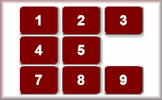 The six button has dropped off! How could these calculations be done using this calculator?
|
Teaching Notes:Many Transum activities have notes for teachers suggesting teaching methods and highlighting common misconceptions. There are also solutions to puzzles, exercises and activities available on the web pages when you are signed in to your Transum subscription account. If you do not yet have an account and you are a teacher, tutor or parent you can apply for one by completing the form on the Sign Up page. A Transum subscription also gives you access to the 'Class Admin' student management system, downloadable worksheets, many more teaching resources and opens up ad-free access to the Transum website for you and your pupils. | |
CommentsHave today's Starter of the Day as your default homepage. Copy the URL below then select Set as your homepage (if you are using Internet Explorer)
Do you have any comments? It is always useful to receive feedback and helps make this free resource even more useful for those learning Mathematics anywhere in the world. Click here to enter your comments. |
|



Karen Donnelly, Twitter
Thursday, June 29, 2017
Transum,
Thursday, June 13, 2019
"I have just noticed something I hadn’t realised about the Windows calculator. When running in standard mode it operates LTR (2+3x5=25) while in scientific mode it obeys the normal order of operations (2+3x5=17). Worth knowing when learning about BIDMAS or PEMDAS
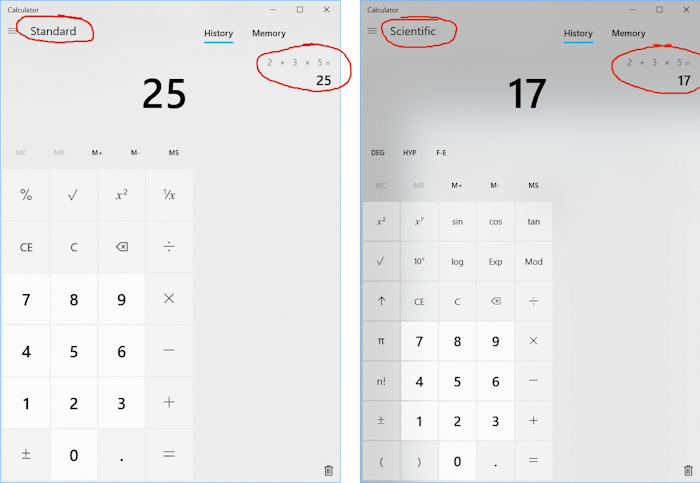
"Dave Grochocki, Twitter
Sunday, June 16, 2019
Transum,
Tuesday, September 10, 2019
"And the sad thing is that I still remember some of these calculators that are now museum exhibits.
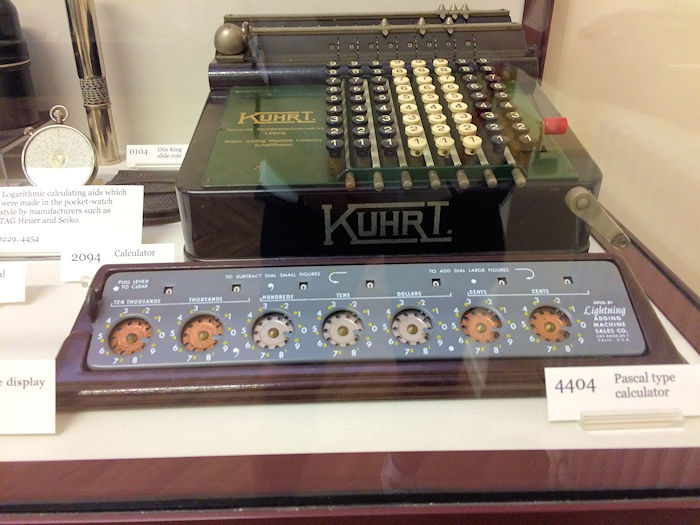
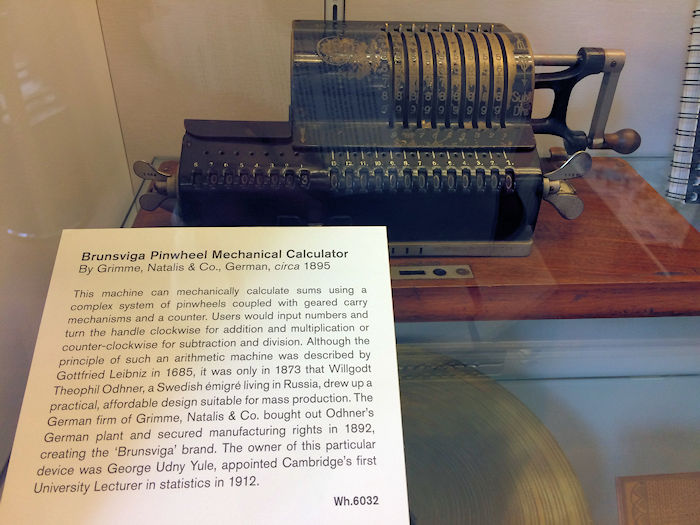
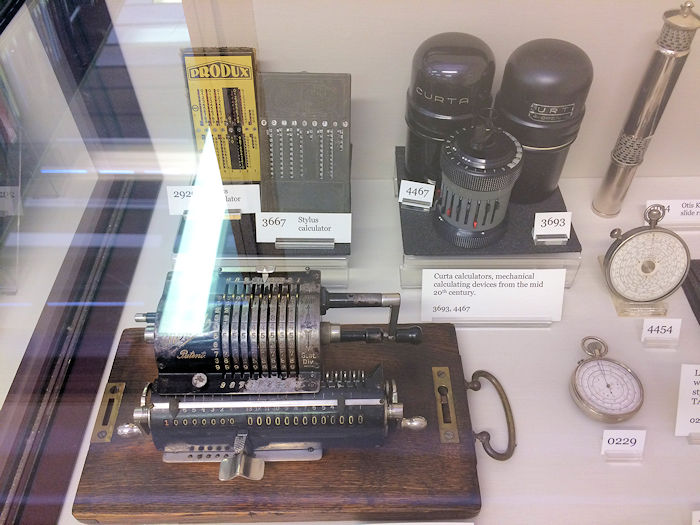
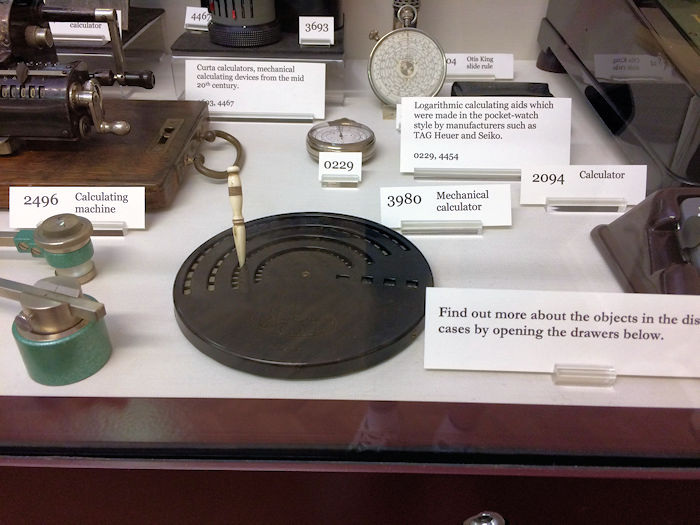
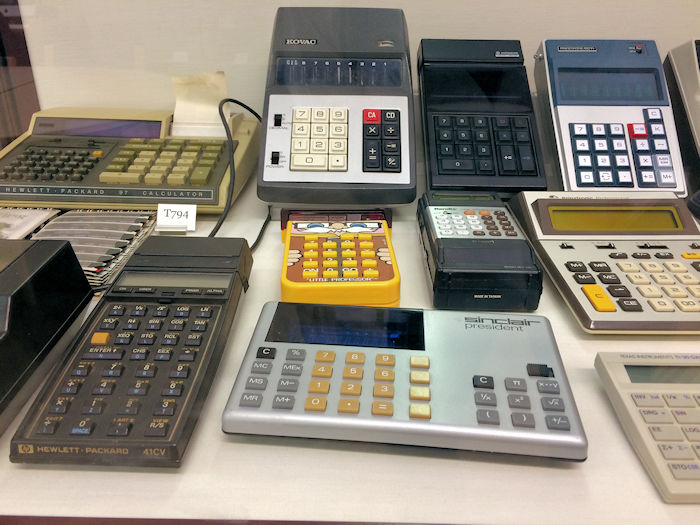
I took these photographs in the Whipple Museum of the History of Science in Cambridge in July 2019"