
The Transum name selecting application helps teachers choose students in a completely random way. Click on the select button to find one of the student names in the class list.
Click on the 'save' button at the top of the list of names to save them to a cookie on the computer you are currently working on. The names will then be available the next time you visit this page on this computer for up to 365 days. Please see the Privacy Policy.
If you have saved the list of names in the class list on the right of this page you can also use:
Arrange into groups
This page is designed to remember one class only. If you would like to use it with multiple classes sign up for Class Admin.
FAST < < < < < Speed of Selection > > > > > SLOW
Featured ActivityKey Stage 2 Tests There are some wonderful questions for Year 6 pupils in the Key Stage 2 Maths Tests (SATs) which normally take place at this time each year. Here are some links to Transum activities for the main Maths attainment statements. Click the image above to begin. |
Recently UpdatedKnights of the Circular Table A royal seating investigation for brave pattern spotters, careful counters, and anyone willing to seat a few knights at the round table. So far this activity has been accessed 175 times and 35 Transum Trophies have been awarded for completing it. |

Do you have any comments? It is always useful to receive feedback and helps make this free resource even more useful for those learning Mathematics anywhere in the world. Click here to enter your comments.



Melissa Mazur, LearningLabResources.com
Thursday, January 12, 2017
"I have used this random student generator website for a few years now and it is amazing how much the students love it. I have a lot of partner and small group work in my classroom and I can guarantee that EVERY time I say there will be partners, the kids always ask, 'Can you use the Random Student Generator?'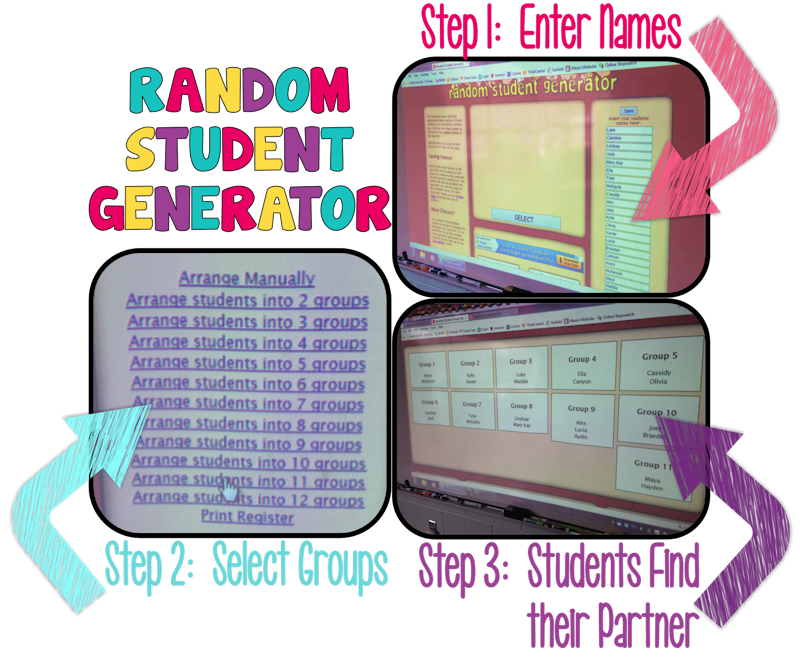 "
"
Ian Guthrie, CSC
Tuesday, May 9, 2017
"Can you add some music to the Random Generator page or applause or some encouraging sound?"
Jim.The.STEAM.Clown,
Saturday, February 10, 2018
"I like the random student generator, but I want a feature to have a true "pick from the hat" where you start with ... say 10 names, you pick 1 and then that name is removed until you reset... so next time you pick you are only picking from 9 names, then 8, then 7.... until you have randomly picked all the names, then you reset back to the original 10."
Transum,
Sunday, February 11, 2018
"Great idea Jim. A hat has been provided and can be found here: Names in a Hat. Your suggestion of sound effects Ian, have been added to that page too. Thanks everyone for the feedback."
R.Thompson, Rockville
Friday, May 11, 2018
"I have two classes can two separate classes be saved?
[Transum: In order to save two or more classes they need to be first set up in Class Admin.]"
Henry D, PA
Wednesday, November 14, 2018
"Is there a way to export this to a smartboard program to include it in our morning meeting?
[Transum: Hello Henry. There is no need to export it. Just use it directly from this web page. The computer code that makes it work would not survive the exporting process!]"
Elizabeth, Oregon
Wednesday, April 17, 2019
"Is there a way to save a class and then eliminate people who are absent? I have a poor attendance rate!
[Transum: Thank you for your question Elizabeth. The short answer is no but this facility can be included in the list of features to be added during the next upgrade.]"
David, England
Friday, November 8, 2019
"Do you need to pay for a subscription to permanently save 1 class?
Thanks.
[Transum: It depends what you mean by permanently. The free version saves one class list on your computer's hard drive as a cookie. The names will then be available the next time you visit the page on that same computer for up to 365 days.]"
John, Austin
Monday, July 20, 2020
"This is great, thanks!!! Could there be an option to reduce the amount of time the system pretends to be "shuffling" the names."
Peter Mitchell, Singapore (Australian)
Wednesday, August 5, 2020
"I agree with John's suggestion... reducing the time to pick a name... or maybe an option to the time?
[Transum: Thanks for the suggestion John and Peter. I will start working on it.]"
Transum,
Wednesday, August 5, 2020
"A shuffling speed controller has now been added. You can now reduce the time taken to pick a name by dragging the handle on the slider to the left. You can find this control just below the select button."
Heidi Mullin, Corinth, NHY
Monday, September 14, 2020
"Could it be made possible to copy and paste a list of names from an excel/sheets doc or word/Google doc into your list so I don't have to type each student's name every time?
[Transum: If you are a Transum Subscriber you can import class lists from spreadsheets.]"
Farah, Malaysia
Saturday, January 30, 2021
"I have 58 students in my class. Can I add another 21 names to the existing lists?
[Transum: If you have a Transum subscription you can have up to 200 students in a class - I wouldn't like to have to mark the exercise books of that many students in one class though!]"
Jessica Peterson,
Tuesday, February 1, 2022
"Is it possible you can make a way to copy and paste a class list into the generator, or upload information from a Google sheet or Excel spreadsheet to save time? I teach 170 students (5 classes) and it's very time consuming.
[Transum: If you become a Transum subscriber you can import student names from spreadsheets into online class lists which can be used with this page. You can subscribe here.]"
Broderick Cox, Elevate K-12
Sunday, January 15, 2023
"Hi, I'm a virtual teacher in which I log into the company's portal to teach content. I'm unable to share my desktop when I'm logged into the company's portal. Is there a way possible for the name selector to be a shareable link that is real time. So my students can see the individual that it selected by the name picker in real time on their devices as I spin the wheel.
[Transum: Thanks for your email. That’s a very good suggestion but not one I could implement in the foreseeable future I’m afraid. I use a program called ManyCam for the virtual tuition that I do. This software makes it very easy to share an individual web page (rather than your desktop) and it feeds into your video conferencing app (Zoom, Teams – or the Elevate portal I would guess). If you search on YouTube there are many demonstrations of how ManyCam is used.] "
Immanuel Osagie, Whistable, Kent, UK
Thursday, November 9, 2023
"Sorry, but when I generated some names for a competition, I ended up with the same student 3 times in a row. Is it possible to change the code slightly so that every one gets picked the same number of times?
[Transum: Thanks for your feedback. The behaviour you described is intended as it is truly random. Use the Names in a Hat version if you want the 'not replaced' situation. The link is in the left margin above.] "